Install APK on Your Android Phone
First you need to install the APK file on your android phone. In order to do that, simply follow the steps below:
- Place the APK file in your phone’s SDcard or Internal memory (preferably external SDcard).
- Browse your phone memory/external memory and tap on the APK file.
- Click ‘install’
- Wait for the APK to install.
- Do not run the application yet.
- After successful installation, you need to place the Data / OBB file in the right place.
Where to put the OBB or Data file?
- First of all unzip/extract the downloaded OBB or Data file in your PC or laptop.
- Copy the ‘Data’ folder and place it into the given path:External SD Card > Android > Data > **paste the folder here**In case of OBB files, copy the OBB folder and place it in the given path here:External SD Card > Android > OBB > **paste the folder here**
- If you cannot find the OBB or Data folder, you can create a new folder manually.
- Make sure that the files are successfully copied in your SDcard.
- Disconnect your phone from PC.
- Run the APK file now.
Method 2: How to Install XAPK files using XAPK Installer
Note: For this method to work, you need to enable the USB Debugging on your Android device. Then plug your Android device into a computer via USB cable. if needed, You can download necessary USB drivers here.
1. Download the XAPK (APK with OBB) file or APK of App/game you want to install. You can download them from APKPure and transfer them to your PC.
2. Download Pure APK Install Application and Open it on your Windows PC.
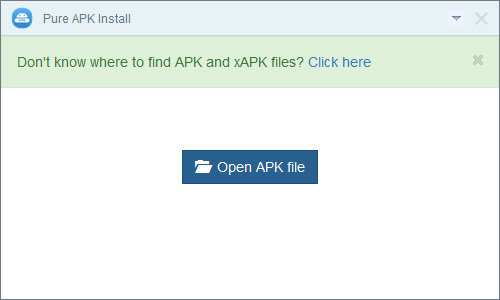
3. Choose or Drag & Drop the XAPK file you have downloaded earlier.
4.
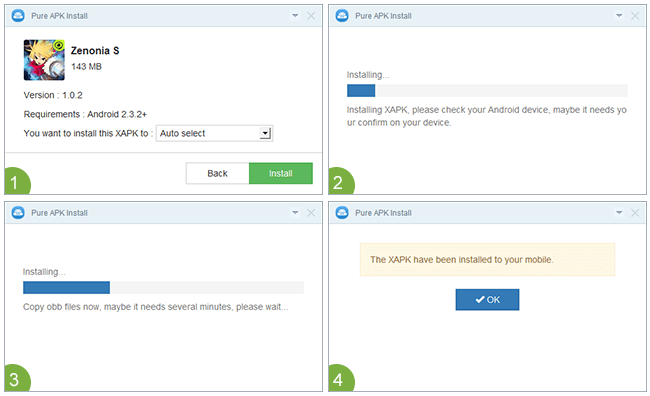
Now, Verify the App details in the preview window and then select
external SD Card or Android internal memory to install it. In case you
are not sure, just leave the options as Auto select.
5. Then proceed with installation by clicking on “Install button”. The XAPK will be extracted and installed on the device.
6.
It will hardly take only 10-15 seconds to finish XAPK installation.
But, in case XAPK (APK with OBB file ) size is larger than 500MB, it may
take longer times up to 1-2 minutes depending on your PC specifications
and file size.